Exporting your AI Model
For the following steps you need to be connected to the ONE AI Cloud
In order to test your AI model or to use it in your application you can initiate a download by clicking on the Export button. You have the option to export it as a model file or readily embedded in a software project. If you are missing an export option that you need for your AI project, feel free to contact us and we will see what we can do.

Clicking the Export button opens the export window.
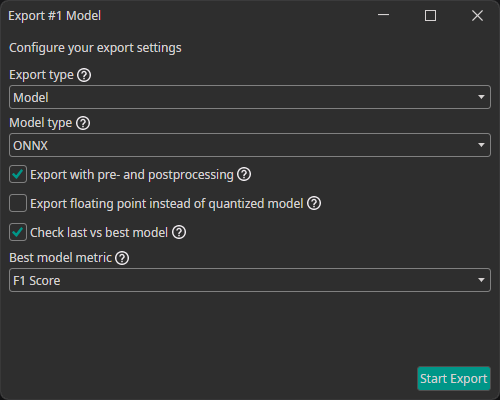
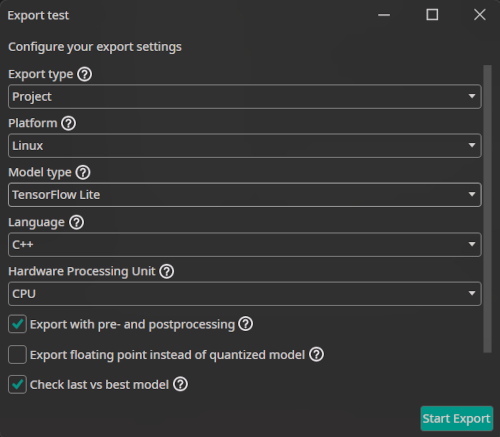
This allows you to configure different settings for the export:
Export type: You can choose whether you want to export just the model as a file (model) or to export it along with execution routines in various languages either compiled as an executable binary (executable) or as source code (project).Model type: There are different model types that can be generated:TensorFlow: The standard TensorFlow model format.TensorFlow Lite: The TensorFlow Lite format is optimized for mobile and embedded devices. You can use this for microcontrollers, FPGAs with processors and other efficient AI implementation on processors.ONNX: The Open Neural Network Exchange format ensures compatibility across different frameworks. It is also used by OneWare Studio for running a live preview of the model and for auto-labeling data. Currently, the ONNX export doesn't support quantized models. If you export an ONNX model, the progress of the quantization aware training will be ignored.VHDL: A hardware description language output that is used for bare metal FPGA implementations.
Platform: Specify the target platform which should run the model. Currently only Linux and FPGA are supported, others are in development. For unsupported platforms please use the direct model export or contact us. This dropdown only appears ifexport typeisexecutableorproject.Language: Specify the programming language for the project or executable. Currently only C++ is supported, others are in development. This dropdown only appears ifplatformisLinux.Hardware Processing Unit: Specify the target Processing Unit. Currently onlyCPUis supported, others are in development. This dropdown only appears ifplatformisLinux.Export with pre- and postprocessing: If you select this option, the pre- and postprocessing layers are included in the exported model. This simplifies integrating the model in your existing processes and ensures consistency between training and inference.Export floating point instead of quantized model: You have the option to always export a floating point model, even if you used quantization aware training. This means that any progress of the quantization aware training is ignored.Check last vs best model: During the training, ONE AI saves two models: the latest and the one with the best validation metrics (excluding Non-Maximum Suppression). If you enable this option, ONE AI checks which of the two models performs best when all post-processing steps are applied. Furthermore, you are able to specify which metric you want to use for this comparison.Best model metric: The metric that is used when comparing the best and the last model.
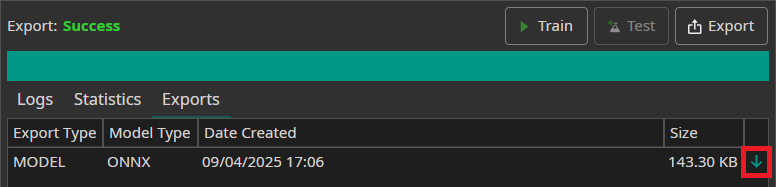
After the export is finished, the model can be download in the Exports tab by clicking on the green arrow.
Export Flavors
Below is a table with all currently available export options. Each line corresponds to one export configuration. If you are missing an export option that you need for your AI project, feel free to contact us.
| Export type | Platform | Model type | Language | Hardware Processing Unit |
|---|---|---|---|---|
| Model | - | TensorFlow | - | - |
| - | TensorFlow Lite | - | - | |
| - | ONNX | - | - | |
| Project | FPGA | VHDL | - | - |
| Linux | TensorFlow Lite | C++ | CPU | |
| Executable | Linux | TensorFlow Lite | C++ | CPU |
Integration into your Setup
In order to run the AI within your setup everything needed is an inference engine within the software corresponding to the model type (e.g. Tensorflow or ONNX-runtime). The following flow chart depicts a possible tool chain. The colorized parts are provided by One Ware.
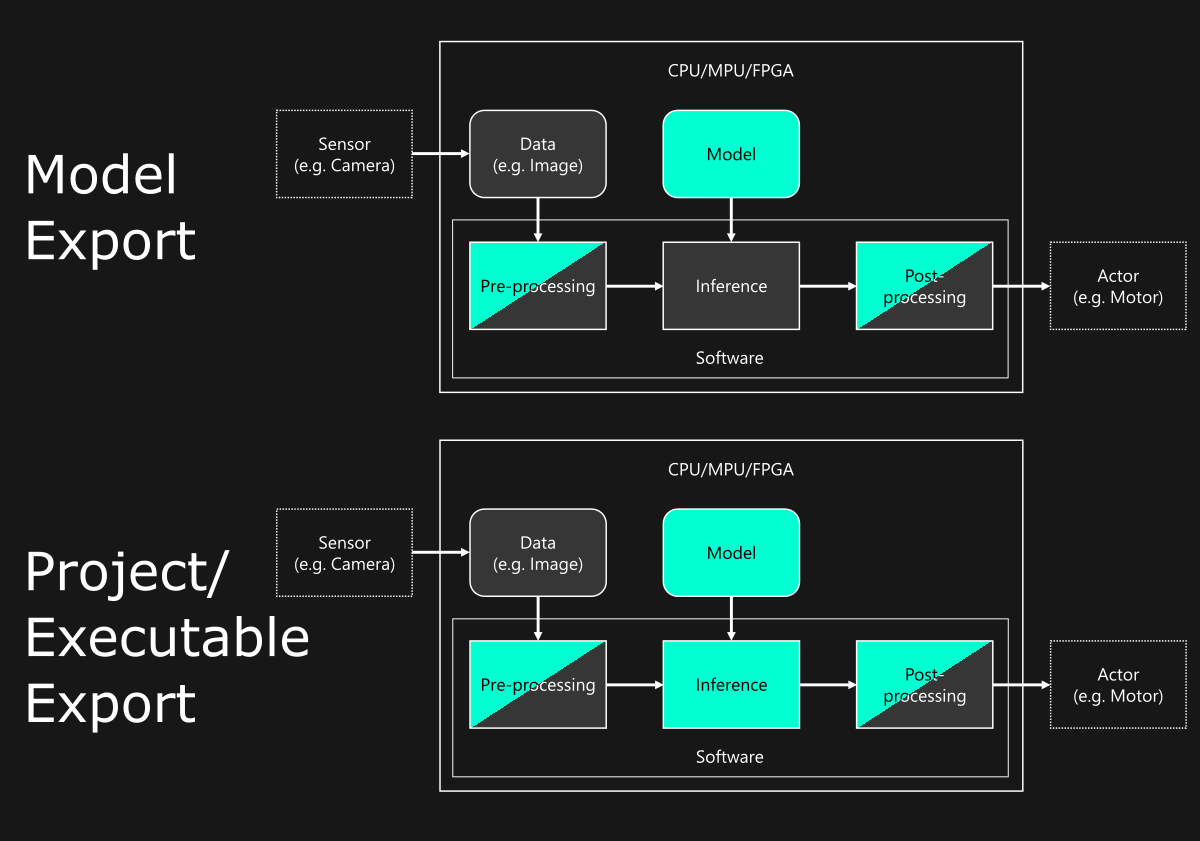
When exporting a model file you can integrate our AI into your existing software solution or create your own. When exporting a project or binary we provide the necessary runtime along with the model. A project obtained this way can easily be adapted to your needs, see also our documentation.

Need Help? We're Here for You!
Christopher from our development team is ready to help with any questions about ONE AI usage, troubleshooting, or optimization. Don't hesitate to reach out!