The OneWare VHDL Documentation
When exporting your trained model you have the option to export as a VHDL project for an FPGA. Aside from the model itself this project contains also the VHDL code necessary to run your model. This page gives you the necessary information to integrate your OneAI model into your FPGA project.
Export Project Content
The VHDL export gives you a folder with the following content:
CoreContains helper modules concerning CNN-architecture.FiltersContains helper modules for data preprocessing.Quartus_IPThe One Ware IP for Quartus (e.g. to connect the CNN with a CPU)ONEAI_Confic_Package.vhdConfiguration settings.ONEAI_Data_Package.vhdThe model weights.ONEAI_Simulation.vhdA VHDL file you can use to simulate the model.ONEAI_Top.vhdThe top level design entity to integrate into your project.Test_Data_Package.vhdTest data for simulation.
Core Concept: Stream
All modules of the OneAI-code make use of streams. These are a signal type, used to pass data into and throughout the CNN in VHDL. The stream type CNN_Stream_T is defined in the file ONEAI_Confic_Package.vhd. Streams implement the following signals:
Data_CLKDesign clockData_ValidIndicator that data is validColumnCurrent pixel columnRowCurrent pixel rowFilterCurrent pixel filter (relevant for convolution; for the top-level input of the CNN usually leave this at0)
This is paired with a Data signal consisting of n-dimensions depending on the images colour channels. Each channel is a 7-bit unsigned signal encoding the respecting pixel value in the range 0...127.
In case of multiple input Data signals (e.g. multi image analysis) all Data signals need to adhere to the same input stream, i.e. they must share clock, valid, ... signals.
Simulation
For simulation purposes you can simply use the ONEAI_Simulation module as the top level entity.
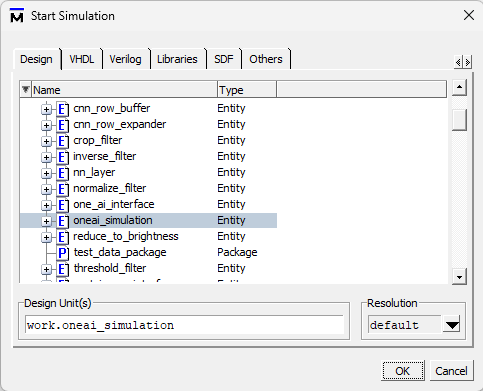
This simulation module will take example data included in the Test_Data_Package.vhd and run it through the model. Here you have the oportunity to verify correct inputs (iStream) and the output produced by the CNN (oStream).


Implementation
When including the OneAI model into your FPGA project simply include the ONEAI_Top.vhd module CNN into your design. The module has one input stream paired with one or more data signals. E.g. for standard RGB-image classification with one image, there is one data signal iData_1 with three channels. A multi image input would require multiple iData_x signals.
iStreamInput streamiData_1Input data (n-channel)oStream_1Output streamoData_1Output data (n-channel)oCycle_1Current output cycle
The output of the CNN-module adheres to the stream format as well. For classifiers the output data is the confidence for each of the classes. As there is only one output data channel, the confidences for each class are given out in consecutive clock cycles. The current class is indicated by the oCycle_1 signal. The confidence is encoded as a 7-bit unsigned integer. A large value indicates a high confidence. A percentage based confidence can be derived by dividing the value of the oData_1 signal by 1.27 in the postprocessing.
| Cycle | 0 | 1 | 2 |
|---|---|---|---|
| CNN Output | 0x12 | 0x01 | 0xFE |
| Probabilities | 0.14 | 0.01 | 0.99 |
The output will be generated a few clock cycles after the last input pixel is reached. The exact latency depends on the number of layers of the CNN. Be sure to leave the clock running after providing the last pixel data. It is possible to already start the next inference before the output is generated. Just start again with the (0,0) pixel after the last pixel of the former image was provided.
Example instantiation of the CNN-module (assuming singular image classification with 3-channel RBG input):
COMPONENT CNN
	PORT (
		iStream       : IN CNN_Stream_T;
		iData_1       : IN CNN_Values_T(2 downto 0);
		oStream_1     : OUT CNN_Stream_T;
		oData_1       : OUT CNN_Values_T(0 downto 0);
		oCycle_1      : OUT NATURAL
	);
END COMPONENT;