Introducing ONE WARE Agents: EU Hosted AI Agents That Build Fast, Accurate Vision Models

ONE WARE Agents build custom ONE AI vision models for you, right inside ONE WARE Studio. Run the agents with your ONE WARE account in EU data centers, bring your GitHub Copilot subscription, or use self-hosted options.
Describe what you want to detect, and ONE WARE Agents handle the rest: from dataset creation to model export for your hardware.
The Agent Builds the Model, Your Hardware Runs It
ONE WARE Agents don't run inference on your production line. Large AI models are far too slow and expensive for high-speed inspection. Instead, the agent acts as a vision AI engineer: it uses ONE AI to generate a specialized architecture tailored directly to your data and target hardware.
The resulting model:
- Is faster and more accurate: ONE AI models usually beat universal networks, for example with 10× fewer errors than YOLOv8 or 24× fewer errors on a €45 FPGA. The detector in the demo video runs at >500 fps with 1.8 ms latency on a CPU.
- Fits your hardware: from microcontrollers and FPGAs to CPUs and GPUs (supported hardware).
- Runs 100% locally: Zero cloud dependency, zero internet connection required, zero agent overhead.
- Integrates anywhere: Export directly to ONNX, TensorFlow Lite, or synthesizable VHDL.
What ONE WARE Agents Can Do
With access to over 40 native tools, ONE WARE Agents don't just chat. They operate ONE WARE Studio and ONE AI directly:
Projekte & Einstellungen
Richtet Ihr ONE AI Projekt ein und findet die passenden Einstellungen für Ihre Aufgabe und Ihre Zielhardware.
Labels & Bildverarbeitung
Legt fest, was Ihr Modell finden soll und wie Ihre Bilder für das Training vorbereitet werden.
Datensatz & Import
Bringt Ihre Daten ins Projekt und stellt sicher, dass sie bereit fürs Training sind.
Auto-Labeling & Prüfung
Labelt Ihre Bilder automatisch, sodass Sie das Ergebnis nur noch prüfen und korrigieren müssen.
Synthetische Daten
Erzeugt Trainingsdaten, wenn Sie wenige oder keine echten Bilder haben, sodass Sie sofort ein erstes Modell trainieren können.
Training, Test & Export
Trainiert Ihr Modell in der OneWare Cloud und liefert ein getestetes, einsatzbereites Modell.
Dateien & Terminal
Arbeitet mit Dateien und Tools in ONE WARE Studio wie ein Entwickler.
Beyond tool access, agents incorporate built-in ONE AI domain rules: recommending resolution based on feature size, enforcing clean validation splits, tuning augmentation pipelines, and analyzing training metrics to suggest improvements.
EU Hosted, Self-Hosted, or Your Own Subscription
Choose the provider and hosting model that fits your security requirements:
- EU Hosted Models: Processed exclusively in European data centers (GPT-6.1 Sol (EU), GPT-6 Luna (EU), DeepSeek V4 Flash (EU), FLUX.2 Pro (EU)). Organization admins can enforce an EU Only Policy under Settings → Policies to block any data from leaving the EU.
- Self-Hosted Models: Run the agent on your own model server, for example with Ollama or any OpenAI-compatible endpoint, so the chat never leaves your network.
- GitHub Copilot: Sign in with your existing GitHub account and use your Copilot plan directly inside ONE WARE Studio.
- Bring Your Own Key (BYOK): Connect OpenAI, Anthropic, or any OpenAI-compatible API with your own API keys.
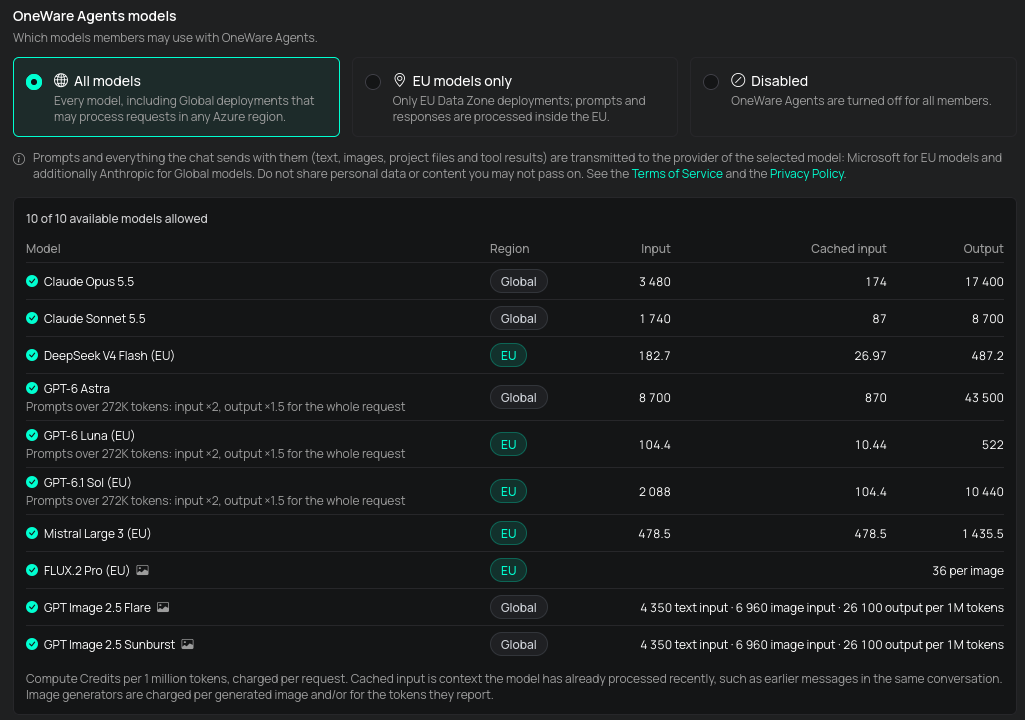
Full Data Privacy, End to End
Combine a self-hosted agent with a self-hosted training worker, and your images, prompts and models never leave your infrastructure. The finished model runs offline on your device, without the agent and without an internet connection.
Synthetic Data with Image Models
Need a model before having hardware or physical samples? ONE WARE Agents combine language models with generative image models like FLUX.2 Pro (EU) and GPT Image 2.5 Flare:
- Generate training samples from text prompts or reference photos.
- Simulate defects, lighting shifts, and background variations.
- Auto-label synthetic assets automatically for immediate training.
Get Started
ONE WARE Agents are available in all Pro plans and the Pro Trial, as well as with existing GitHub Copilot or BYOK setups:
- Update the ONE AI extension in ONE WARE Studio.
- Open View → Tool Windows → AI Chat.
- Select your provider (ONE WARE Agents, GitHub Copilot, or BYOK).
- Switch to Agent mode and describe your task.
Need a trial or have questions? Book a demo or reach out at sales@one-ware.com. For technical setup, visit the ONE WARE Agents documentation.