Multi-Image datasets
Multi-Image datasets consists of image sets, which are images grouped by their filename suffixes. These suffixes need to be specified as Image Groups in the General tab. Learn more about configuring multi image projects in the General Settings section.
The image files may lie flat in the target directory or be structured in subfolders. Example for the image groups rgb and depth:
- img001_rgb
- img001_depth
- img002_rgb
- img002_depth
- img003_rgb
- img003_depth
- ...
Inspection
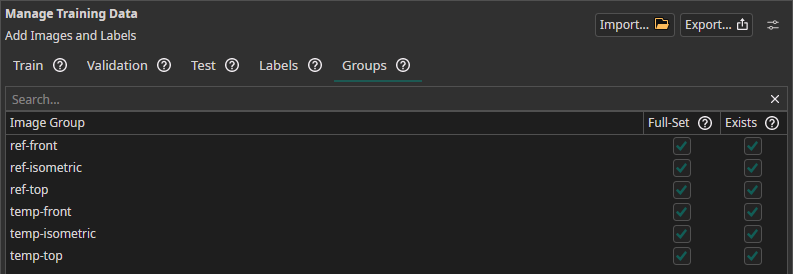
If multi-image is enabled, a new tab appears in the dataset page: The Groups tab. This tab should help users spotting missing images or missing configuration.
| Column | Description |
|---|---|
| Full-Set | Checks if any images of this group are missing in a set. Incomplete Image-Sets are showing an exclamation mark. |
| Exists | Checks if a filename suffix doesn't exist as configured Image-Group. |